
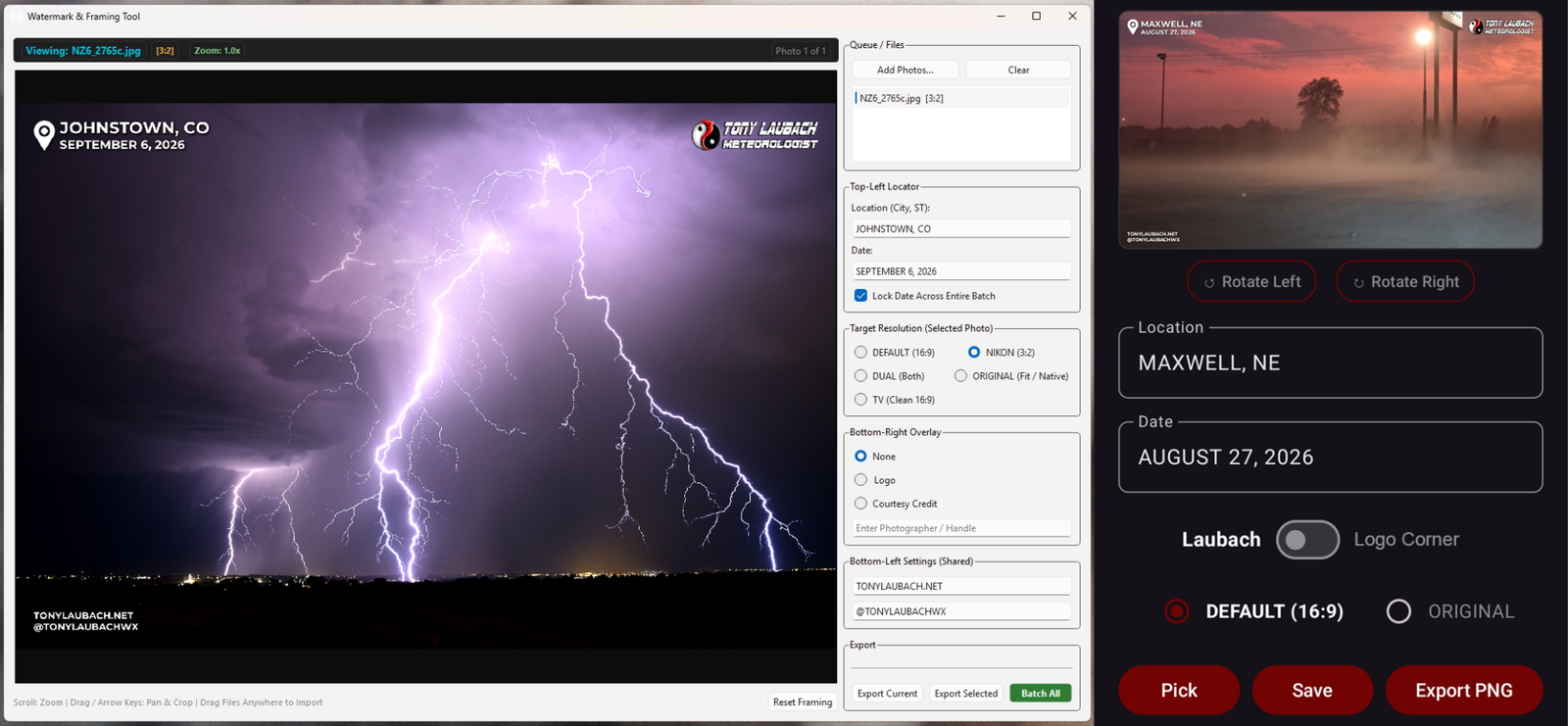
I am SOOO EXCITED to finally have a pet-project completed! Earlier this year, I created a watermarking app that I’ve been using on my phone so I could quick turn phone pictures for social, applying my watermark to those photos in a simple app. After some small changes, I was using this with great success and ease through the season. But one issue remained for me, and that was having this for my computers. My PC workflow all consisted of one-by-one exports in Premiere, where I had a motion graphics locator and a separate PNG file placed in a timeline over a series of images that I would have to manually change the locator every time if the location changed. It was time consuming, and limited to the HD resolution as I would have to create separate timelines for different sizes (i.e. Nikon’s standard 3:2). I went along with it all season because I hadn’t had a chance to really write out the PC program script.
Well, I finally made some time, creating a PC program from scratch with a handful of features I couldn’t really have or need in the mobile app. After some trial and error (and the fantastic test from Sunday’s lightning), I was finally able to hone in a finished first version with a handful of really handy features that make watermarking images SO much quicker and do so WITHOUT Premiere, which was the main goal. Once that was locked in, I went back to the mobile app, and revised it to include many of the PC features, stripped out excess stuff I won’t need for mobile (i.e. multiple output sizes, the social text, etc), and added geo-tagging from the photos to auto-populate location and date, which was a major feature I wanted to add to the original. In addition, I added some basic editing/cropping to the mobile app, including rotation and zoom controls, plus the additional output which keeps the photo at its original dimensions as opposed to the single dimension output. A recent addition to the original app which carried over was the ability to create a transparent PNG with a watermark locator I can import into my mobile video editing software that’ll let me watermark entire video sequences.
The added perk to all this is now everything looks to the same. There were subtle, but noticeable differences in the font, text, and highlights between the Premiere watermarking/locators verses the mobile app. Now, I have the same layout, margins, and font/effects between both, so it should be nearly impossible to see any differences between PC outputs and phone outputs. I also removed the line separator in the locator, which I went back and forth on, but I could not get the code to work with the line on PC, so I just went ahead and dumped it. It’s a very small tweak, but again, everything now looks the same between devices. This is also nice because for images I use here on my website, I used the ‘Premiere’ watermark method, meaning I would have to redo anything I did on my phone. Now, because everything looks the same between the two, I can directly upload the mobile versions and not have to redo them on the PC since they all look the same, eliminating a good chunk of work having to do everything on the PC.
Right now, I have no intention to change anything with my YouTube uploads which use the Premiere motion graphics template, so I’ll leave that as is seeing as that’s a whole different element, and I am perfectly fine with that option. All this needed to do was streamline the watermarking workflow between my devices, get it all looking the same, and add some quality of life features, and I now have a fully fledged out V1 of this for both platforms! This marks my first official programmed app and window-based program! 😀